
TCP vs UDP - Understanding the Core Differences
In the world of networking, two of the most fundamental protocols that drive data transmission are TCP (Transmission Control Protocol) and UDP (User Datagram Protocol). These protocols are essential to how data is sent and received across the internet. Although both serve the same basic purpose, they differ significantly in terms of functionality, reliability, and use cases.
What is TCP (Transmission Control Protocol)?
TCP is one of the core protocols of the Internet Protocol (IP) suite, which ensures reliable, ordered, and error-checked delivery of a stream of data between applications running on hosts in an IP network.
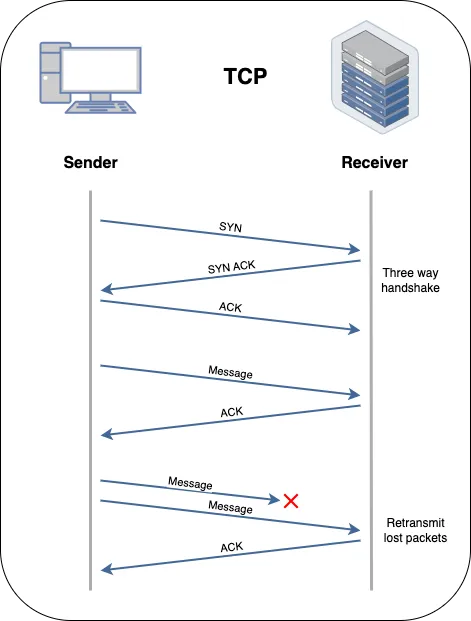
Features of TCP
- Connection-Oriented: TCP establishes a connection between the sender and receiver before data transmission begins, ensuring that all data packets are successfully delivered.
- Reliable Data Transfer: TCP ensures that all data is delivered without errors, duplicates, or loss. It uses acknowledgments (ACKs) and retransmissions to guarantee delivery.
- Flow Control: TCP manages the pace of data transmission based on the network’s capacity, preventing congestion and data loss.
- Ordered Data Transfer: Data is transmitted and received in the same order, providing consistency in communication.
Use Cases of TCP
- Web Browsing: TCP is used in HTTP/HTTPS protocols to ensure that web pages load correctly with all their elements intact.
- File Transfers: Protocols like FTP (File Transfer Protocol) and SFTP (Secure File Transfer Protocol) rely on TCP to ensure complete and accurate file transmission.
- Email: SMTP (Simple Mail Transfer Protocol), which is used to send emails, depends on TCP to ensure messages are delivered without loss.
What is UDP (User Datagram Protocol)?
UDP is a simpler, connectionless protocol that allows for fast, but less reliable, data transmission. It sends data packets (datagrams) without establishing a connection, which can lead to quicker data transfer at the cost of reliability.
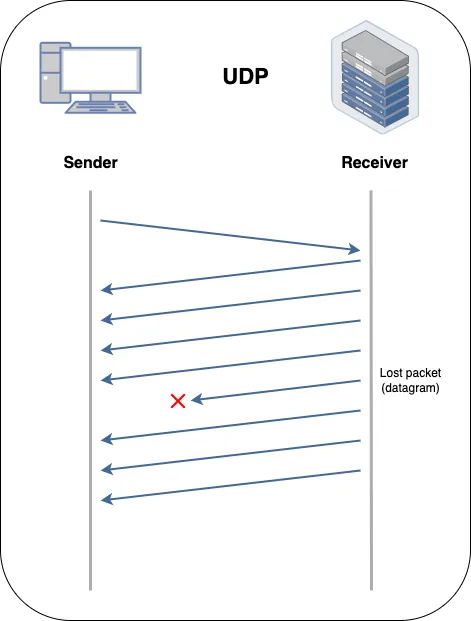
Features of UDP
- Connectionless: UDP does not establish a connection before sending data, allowing for faster data transmission but with no guarantee of delivery.
- Low Latency: UDP has minimal overhead, making it ideal for applications where speed is critical, and minor data loss is acceptable.
- Unordered Data Transfer: There is no inherent mechanism in UDP to ensure that data packets are received in the order they were sent.
- No Error Correction: UDP does not check for errors or guarantee the delivery of data, making it less reliable than TCP.
Use Cases of UDP
- Live Streaming: UDP is used in applications like video and audio streaming where speed is more critical than accuracy, and slight data loss is tolerable.
- Online Gaming: Many online multiplayer games use UDP to minimize latency, ensuring faster gameplay even at the cost of potential packet loss.
- Voice over IP (VoIP): UDP is utilized in VoIP applications for real-time voice communication, where delays can disrupt conversations more than occasional data loss.
TCP vs UDP: A Comparative Analysis
Now that we have an understanding of TCP and UDP, let’s compare these protocols based on their key aspects.
-
Reliability:
- TCP: Highly reliable. It ensures that all data is received correctly and in order, making it suitable for applications where data integrity is crucial.
- UDP: Less reliable. Data packets may be lost or received out of order, which can be acceptable in scenarios where speed is more critical than accuracy.
-
Speed:
- TCP: Slower due to its connection-oriented nature, error-checking, and flow control mechanisms.
- UDP: Faster because it doesn’t require connection establishment or error-checking, making it ideal for time-sensitive applications.
-
Overhead:
- TCP: Higher overhead due to its need for connection management, data ordering, and error correction.
- UDP: Lower overhead, as it skips many of the reliability features of TCP, leading to quicker data transmission with less processing.
-
Use Case Suitability:
- TCP: Best suited for applications requiring high reliability and data integrity, such as web browsing, file transfers, and emails.
- UDP: Ideal for applications where speed is essential, and some data loss is acceptable, such as live streaming, online gaming, and VoIP.
Conclusion
In summary, TCP and UDP are both crucial protocols that serve different purposes based on the needs of the application. TCP’s reliability makes it the go-to choice for applications where data integrity is paramount, while UDP’s speed and low latency make it ideal for real-time applications where performance is more important than perfection.
Choosing between TCP and UDP comes down to understanding the specific requirements of your application—whether you prioritize reliability or speed will guide your decision in selecting the right protocol.